Reports: Webhook Logs - Webhook Output Descriptions

Included below are the various fields found in the webhooks sent by the HCC.
| Field | Sample Data | Description |
|---|---|---|
call_id | 240 | Database ID of the call |
call_date | 2025-04-07 14:43:29 | Timestamp of the call |
lead_id | 172 | Database ID of the lead pulled from the contact list |
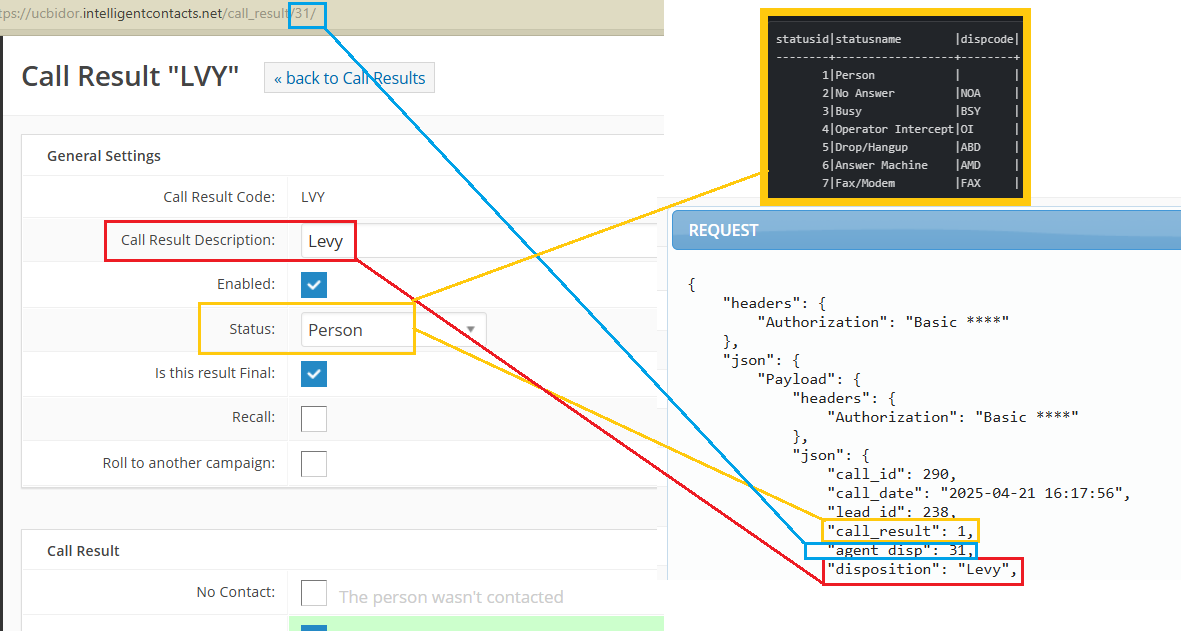
call_result | 2 | ID for the "Call Status" - Person, Busy, Answering Machine, etc. |
agent_disp | 13 | ID for the "Call Result" assigned by the Agent |
disposition | No Answer | Call Result Description |
agent_id | 5 | Database ID for the Agent on the call |
agent_email | kyle@gmail.com | Agent Email |
call_type | Outbound | Call Type |
revenue | 0 | Revenue added in Call Result |
dnis | The number Called Into | |
phone | 2146365130 | The number being called (Outbound) or called from (Inbound) |
camp_id | 55 | Database ID of the Campaign |
pool_id | 6 | ID for the Contact List |
account_id | 12221694 | Account ID provided in Contact List |
call_duration | 22 | Total duration of the call (including dialing, wait, and on hold times) |
talk_time | 16 | Talk time (excluding dialing, wait, and on hold times) |
hold_time | 0 | Time spent “on hold” after connecting to an agent |
queue_time | 0 | Time spent in an IVR queue before an Agent answered their call |
ivr_time | 1 | Time before selecting an option from the IVR and entering a campaign |
position | 0 | obsolete, no longer in use |
is_abandoned | false | Was the call Abandoned? |
api_sent | false | Call data was exported") values: - value: 0 description: "Not processed" - value: 1 description: "Exported to SFTP" - value: 2 description: "Exported via CU_API integration" - value: 3 description: "Re-exported because the call result is changed (this option is under Feature flag)" |
call_final_event | COMPLETEAGENT | Call Termination Event |
idle_time | 10 | Time an agent spent in “Ready” status prior to receiving a call |
wrap_time | 5 | Time spent by an agent wrapping the call after the call is finished |
preview_time | 0 | Time the agent spent in the Preview status, if call was for a Preview campaign |
callback_time | null | Callback time if scheduled via Wrap - Not same as Intelligent Callback/“press 8” |
callback_call_id | 0 | Stores callid of the caller call in which a callback was requested by pressing 8 (Callback request feature) |
caller_id | 8776222159 | Caller ID for Outbound Call |
onhold_queue | false | obsolete, no longer in use |
internal | false | Internal call vs external call |
billable_seconds | 24 | How much of the call would be billed for via standard IC billing |
Mapping Reference for Call Results
Related Articles
Webhooks in Hosted Contact Center (HCC)
Webhooks in Hosted Contact Center (HCC) Overview Webhooks allow the Hosted Contact Center (HCC) and Intelligent Portal to send real-time event data to your system of record. Instead of relying on: Scheduled sFTP exports Manual data retrieval Webhooks ...Reports: Access Log Report
The Access Log Report captures and reports all access into the dialer and can be selected by date range, all users or a specific user. Once the report has completed, it can be exported to either a CSV or PDF. Fields include: Field ...How to add automated transaction reports in Merchant Gateway
How to add automated transaction reports in Merchant Gateway The Intelligent Contacts Merchant Gateway has an “on demand” transaction log that allows a user, depending on that user’s access level, to view transactions and transaction history for any ...Reports: Calls Ineligible
The Calls Ineligible Report provides a list of calls that could not be made for a specific ineligibility reason (ie.., timezone, NPA-NXX) The report can be selected for all campaigns or a specific campaign OR all lists or a specific list. You also ...Reports: Agent Performance
The Agent Performance Report is useful for providing insight into an agent's performance, which can be used for recognition, coaching and/or development. This report can be selected by date range, all agents, or a specific agent. Once the report has ...